ScanFix — AI-Powered Website Auditing & Fixes
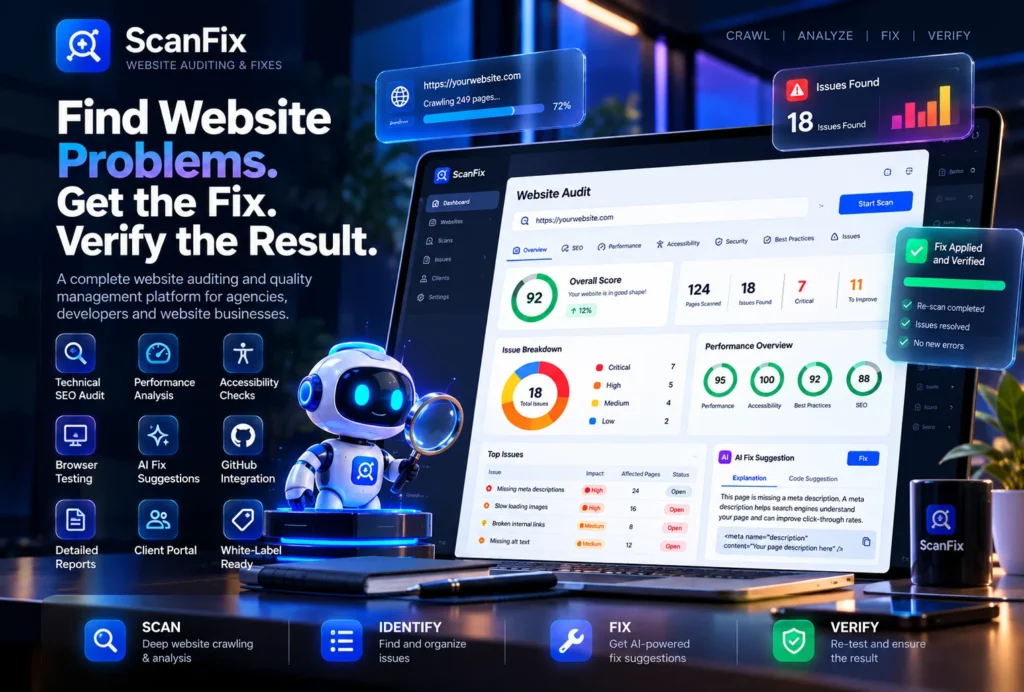
Find Website Problems. Get the Fix. Verify the Result.
ScanFix is a website auditing and quality management platform that helps agencies, developers, and website owners find technical problems, understand what needs attention, and work toward fixing those problems—all from one place.
A website can look perfectly fine to its visitors while hiding problems behind the scenes. Pages may load slowly, important links may be broken, search engines may struggle to understand the content, or JavaScript errors may affect how parts of the website work.
Finding these problems manually takes time. Checking them again after making changes takes even more.
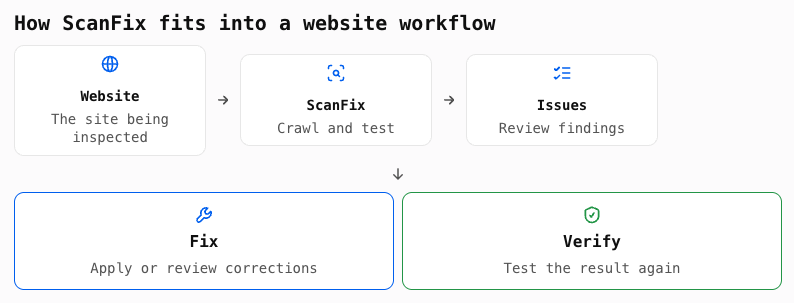
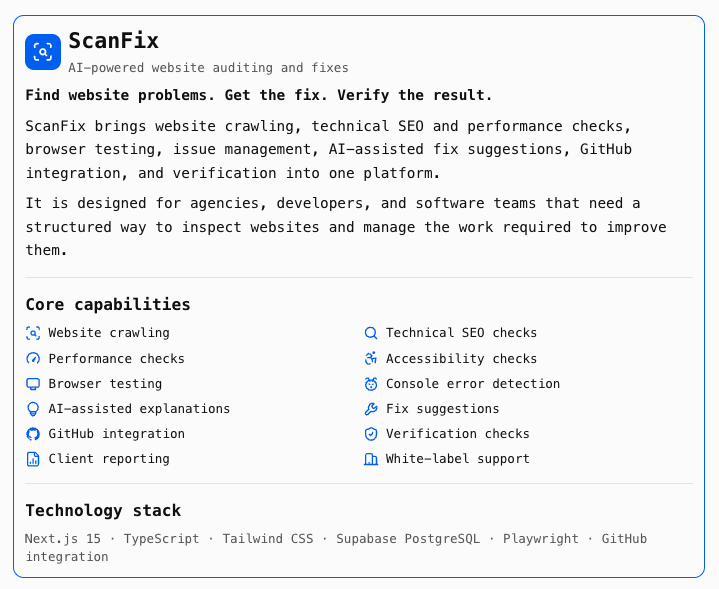
ScanFix brings website crawling, technical checks, browser testing, issue management, AI-assisted fix suggestions, and verification together in one platform. Instead of relying on scattered tools and manual checklists, teams can use a single workflow to inspect a website, review its problems, take action, and check the results.
For agencies and software businesses, ScanFix can also serve as the foundation for a branded website auditing service—with client-facing reports, portals, and white-label capabilities.
1. The Problem ScanFix Solves
Managing website quality becomes difficult as a website grows. A small business website might have only a few pages, but a larger website can have hundreds or thousands of URLs, multiple templates, forms, scripts, and integrations.
Even a website that appears to work normally can have issues that affect its visitors, search visibility, or day-to-day operation.
Website problems are often scattered across different tools
A developer may use one tool to check performance, another for search engine optimization, browser developer tools to find JavaScript errors, and a separate service to monitor availability.
This creates a fragmented process. Teams need to switch between tools, interpret different reports, and manually connect individual findings to the pages and components they affect.
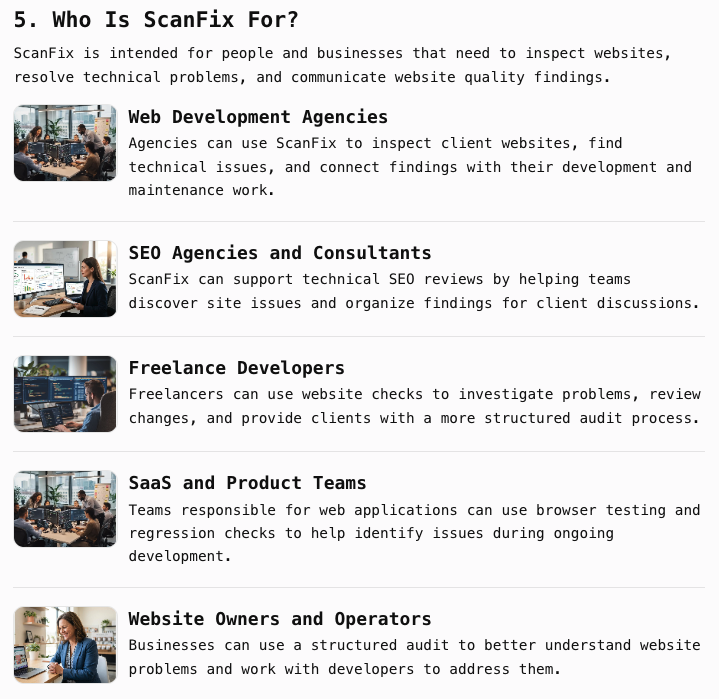
Finding an issue is only the beginning
A report that says a page has a problem does not necessarily tell the person responsible what to do next.
For example, a website audit might identify a slow page. The developer still needs to investigate whether the problem comes from large images, render-blocking resources, inefficient scripts, or something else.
The same applies to technical SEO problems. Identifying a missing title or broken link is useful, but the team still needs to decide how to correct it and confirm that the change worked.
Rechecking changes takes time
After fixing an issue, teams need to check the affected page again. They also need to be careful that the change has not introduced another problem.
When websites are updated regularly, repeating this process manually can become a significant workload.
Agencies need a repeatable way to deliver website audits
For a web development or SEO agency, website audits can be part of a client engagement, maintenance package, or ongoing service.
However, manually inspecting every client's website and preparing reports takes time. Agencies need a repeatable process for examining websites, organizing findings, communicating with clients, and following up on fixes.
ScanFix is designed to bring these activities into one organized workflow.
2. What Is ScanFix?
ScanFix is a website auditing and issue-management platform built to help teams inspect websites and manage the problems they discover.
It combines several parts of website quality work:
-
Website crawling and page discovery
-
Technical SEO checks
-
Website performance checks
-
Accessibility-related checks
-
Browser testing and JavaScript error detection
-
Screenshots and issue evidence
-
AI-assisted explanations and fix suggestions
-
GitHub integration for development workflows
-
Verification and regression testing
-
Client reporting and agency portals
-
White-label capabilities
Rather than treating an audit as a document that gets generated once and forgotten, ScanFix is designed around a process that can continue from discovery through remediation and verification.
A team can use it to understand what is wrong with a website, prioritize its work, review possible fixes, and keep track of whether the problems have been addressed.
For agencies, the same platform can support a repeatable service that is presented under their own brand.
3. Key Features and Capabilities
3.1 Deep Website Crawling
A useful audit needs to inspect more than just a website's homepage.
ScanFix includes a crawler designed to discover and inspect pages across a website. It can use the website's internal links and sitemap information to find pages that should be included in an audit.
This gives teams a broader view of website health instead of relying on a quick check of one or two URLs.
What this helps with:
-
Discovering pages that need to be inspected
-
Finding issues across multiple URLs
-
Understanding which pages are affected
-
Reviewing findings in the context of a wider website
-
Reducing the need to inspect each page manually
For developers and agencies working with larger websites, crawling provides a repeatable starting point for technical audits.
3.2 Technical SEO Auditing
Technical SEO issues can make it harder for search engines to discover, crawl, or understand website content.
ScanFix helps identify technical issues that need attention, including common page-level and site-level problems.
Depending on the checks configured for the product, audits can include items such as:
-
Missing or problematic page titles
-
Missing meta descriptions
-
Broken internal links
-
Page discovery and sitemap issues
-
Indexing-related signals
-
Problems with page structure
-
Other technical SEO checks
The purpose is not to promise higher search rankings. It is to help teams identify technical problems and make informed decisions about what to fix.
For an agency, these findings can also provide a clear starting point for a technical SEO review with a client.
3.3 Website Performance Checks
A slow website can frustrate visitors and make important interactions harder to complete. Performance problems can also be difficult to diagnose because several factors may contribute to the same symptom.
ScanFix includes website performance checks to help teams identify pages and issues that deserve further investigation.
Performance findings can help developers focus on areas such as:
-
Pages that load slowly
-
Large or inefficient page resources
-
Potentially expensive scripts
-
Images and other assets that may affect loading
-
Performance-related problems that need developer attention
These checks help teams understand where to investigate. They do not automatically guarantee a specific speed score or improvement, since actual results depend on the website, hosting environment, third-party services, and the changes made.
3.4 Accessibility Checks
A website should be usable by as many visitors as reasonably possible, including people who use assistive technologies or navigate without a mouse.
ScanFix includes accessibility-related auditing to help teams identify potential barriers and areas that may need review.
This can help surface issues such as missing accessibility attributes or problematic page elements, depending on the checks implemented.
Accessibility findings are a starting point for review—not a guarantee of full legal or standards compliance. Some issues require human judgment and testing with assistive technologies.
For agencies, accessibility checks can be incorporated into a broader website quality review.
3.5 Browser Testing with Playwright
A page can pass a basic HTML check and still fail when a real browser loads it.
For example, a JavaScript error may prevent an interactive component from working. A page may display differently after scripts run, or an important element may fail to load.
ScanFix uses Playwright-based browser testing to inspect websites in a browser environment.
This allows the platform to go beyond static page inspection and examine aspects of how a website behaves when loaded.
Browser testing can help teams investigate:
-
JavaScript console errors
-
Browser-visible failures
-
Page rendering problems
-
Issues that appear only after scripts execute
-
Problems that are difficult to detect through a simple URL check
This is particularly useful for modern websites that rely heavily on JavaScript and interactive components.
3.6 Screenshots and Visual Evidence
A list of errors can be difficult to interpret without context.
Screenshots help developers and clients understand what a page looked like during testing. When paired with issue details, they can make it easier to investigate a problem and communicate what needs attention.
For example, a developer reviewing a failed browser test may benefit from seeing the affected page rather than relying only on a short error message.
Visual evidence can also make audit reports more useful for client discussions.
3.7 AI-Assisted Issue Explanations and Fix Suggestions
Technical reports can be difficult for non-technical website owners to understand.
ScanFix includes AI-assisted explanations and fix suggestions to help users make sense of discovered issues and consider possible next steps.
Instead of presenting only a technical error, the platform can help explain:
-
What the issue means
-
Why it may matter
-
Which part of the website is affected
-
What a possible correction could involve
-
What a developer may need to review
For example, a report might identify a problem with a page title. A useful explanation can describe what is missing and suggest the kind of change that may address it.
For more complex problems, a suggestion should be treated as a starting point for developer review—not as a guarantee that a proposed change is safe or correct.
The value is in helping teams move from an unfamiliar error message toward a clearer, actionable investigation.
3.8 AI-Assisted Code Fixes
For supported issues, ScanFix is designed to help developers work toward code-level corrections.
This can make the process more practical than simply exporting a list of errors and asking a developer to investigate everything independently.
The intended workflow is to identify a problem, review the available fix suggestion, and decide whether to apply the proposed change.
Code changes should always be reviewed and tested before being deployed to a live website. A suggested fix may need adjustment to suit the site's framework, theme, plugins, or custom implementation.
3.9 GitHub Integration
Development teams often manage their websites and application code through GitHub.
ScanFix includes GitHub integration to connect website issue remediation with a familiar development workflow.
Where supported, this can help teams take suggested changes into their repository workflow and review proposed code changes before merging them.
This is useful for teams that want to keep code review and deployment practices in place rather than making unreviewed changes directly to a live website.
The practical benefit: website auditing and development work can be connected instead of handled as two completely separate processes.
3.10 Automatic Verification and Regression Checks
Fixing one issue does not necessarily mean the website is now healthy.
A change can solve the original problem but accidentally introduce another one. A page may also continue to show an issue if the fix was incomplete.
ScanFix includes verification and regression-testing capabilities intended to help teams check websites again after changes.
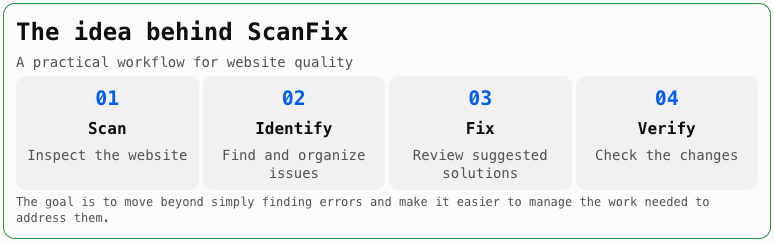
This supports a more complete workflow:
-
Scan the website.
-
Identify an issue.
-
Make or review a correction.
-
Run checks again.
-
Compare the result with the earlier finding.
-
Continue investigating if the problem remains.
Verification is particularly valuable for agencies and development teams that make frequent website updates.
It provides a way to check the outcome of work rather than assuming that a code change has resolved the problem.
3.11 Issue Management and Prioritization
An audit may uncover several different kinds of issues. Some may affect a large number of pages, while others may be isolated or relatively minor.
ScanFix is designed to organize findings so teams can review and manage them instead of treating the audit as one long, unstructured list.
This gives developers and agencies a clearer way to decide what to investigate first, track outstanding problems, and review progress.
A structured issue workflow can also help teams communicate with clients about which problems have been identified and which still need attention.
3.12 Client Reports and Agency Portals
Agencies need more than a technical tool. They also need a way to present findings to customers.
ScanFix includes client reporting and portal capabilities designed to support agency workflows.
An agency can use these capabilities to organize website audits for its clients and present relevant findings through a client-facing experience.
This can help reduce the amount of manual work involved in preparing and explaining every audit.
For an agency offering website maintenance, technical SEO, or website quality services, client reporting can become part of a repeatable service process.
3.13 White-Label Capabilities
ScanFix is designed with agencies and software businesses in mind.
White-label capabilities allow a reseller or agency to present the platform under its own brand, subject to the applicable license.
This can be useful for businesses that want to offer website auditing as part of their own service portfolio without building an auditing platform from scratch.
A white-label deployment can provide the foundation for a branded client experience, helping the agency keep the software aligned with its existing business identity.
4. How ScanFix Works in Practice
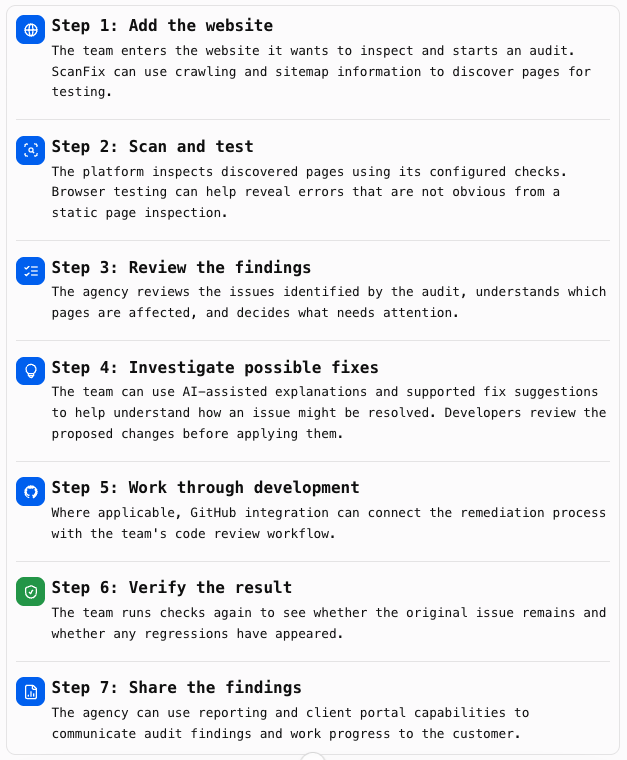
Imagine a web development agency has a client with a business website containing 150 pages.
The client reports that some pages are slow, and the agency also wants to check for technical SEO problems before beginning a maintenance engagement.
Without a centralized workflow, the team may need to run separate audits, collect reports, inspect pages manually, and prepare a summary for the client.
With ScanFix, the process can be organized into a series of steps.
6. What Businesses Can Do With ScanFix
ScanFix is more than a way to generate an audit report. It can support several kinds of website-related work.
Technical website audits
Use ScanFix to inspect websites and identify issues that need investigation. Agencies can include the findings in technical reviews and client recommendations.
Website maintenance
Use recurring or follow-up checks, where configured, to help review a website after updates and maintenance work.
Website quality assurance
Development teams can use browser tests and regression checks to help identify problems that may appear during changes to a website.
Client reporting
Agencies can use reports and client portal features to present findings and communicate the status of website work.
Productized website services
An agency can package website auditing, issue reviews, and remediation into a clearly defined service. ScanFix can support the inspection and reporting workflow behind that service.
Branded website auditing software
With the appropriate white-label license, an agency or software business can deploy ScanFix under its own brand and build a commercial offering around it.
7. Turn Website Auditing Into a Repeatable Service
Many agencies already provide web development, SEO, or maintenance services. ScanFix gives them a way to organize the technical inspection part of that work.
For example, an agency might structure its service offerings around:
|
Service |
How ScanFix can help |
|---|---|
|
Website health audit |
Crawl and inspect a website, then review the findings |
|
Technical SEO review |
Identify technical issues that need attention |
|
Website quality checks |
Run browser tests and review errors |
|
Post-fix verification |
Check whether identified issues have been resolved |
|
Client audit reporting |
Present findings through reporting and portal capabilities |
|
White-label audit service |
Offer the platform as part of the agency's branded services |
The agency remains responsible for defining its services, reviewing findings, carrying out any required work, and setting its own pricing.
ScanFix provides the software workflow that can help support those services.
The business opportunity is not a promise of automatic revenue. It is the ability to offer a more organized website auditing service using software that the agency can brand and operate.
8. Technical Architecture and Technology Stack
ScanFix is built using a modern web application stack, with separate responsibilities for the user interface, data storage, crawling, browser testing, and development integrations.
Technology overview
|
Frontend |
Next.js 15, TypeScript, Tailwind CSS |
|
Database |
Supabase PostgreSQL |
|
Browser testing |
Playwright |
|
Crawling |
Deep website crawler with sitemap parsing |
|
AI capabilities |
Issue explanations and fix suggestions |
|
Code integration |
GitHub integration |
|
Security and access |
SSRF safeguards, RBAC, TOTP, SAML/OIDC and SCIM capabilities |
|
Commercial deployment |
Agency white-labeling and master license server architecture |
Architecture summary based on the ScanFix project details. Specific deployment requirements depend on the edition and configuration.
Frontend: Next.js 15, TypeScript, and Tailwind CSS
The application interface is built with Next.js 15 and TypeScript, with Tailwind CSS used for styling.
This stack supports a modern web interface for managing websites, reviewing audit findings, and working through the platform's different areas.
TypeScript also helps make application code more consistent by providing static type checking during development.
Database: Supabase PostgreSQL
ScanFix uses Supabase PostgreSQL for its relational data layer.
A relational database is well suited to organizing information such as users, websites, scan records, audit findings, and other connected application data.
Supabase provides a PostgreSQL-based backend foundation, while the exact deployment and operational configuration depend on the product edition.
Website Crawling and Sitemap Parsing
The crawling system is responsible for discovering pages and collecting information needed for website inspections.
Sitemap parsing helps identify URLs that a website explicitly lists for search engines and other crawlers. Combined with internal link discovery, this can provide a broader set of pages to inspect.
Crawling requires careful controls because the platform makes requests to websites supplied by users. ScanFix includes safeguards designed to reduce risks such as server-side request forgery (SSRF).
Browser Testing: Playwright
Playwright provides browser automation for testing websites in a real browser environment.
It can load pages and inspect browser-visible behavior, making it useful for discovering errors that may not be apparent from static HTML alone.
For ScanFix, browser testing supports the broader audit workflow by adding another layer of evidence about how pages behave.
GitHub Integration
GitHub integration connects the platform to a common code collaboration workflow.
This can help teams review proposed changes and work with their existing repositories instead of treating website fixes as isolated tasks.
The exact actions available depend on the configured integration and supported remediation workflow.
Access Control and Authentication
ScanFix's architecture includes capabilities for managing access and protecting accounts, including:
-
Role-based access control (RBAC)
-
Time-based one-time passwords (TOTP)
-
SAML and OIDC authentication support
-
SCIM capabilities for user provisioning
These features are relevant to agencies and teams that need to manage access for multiple users.
The availability of individual authentication features may depend on the deployed edition and configuration.
9. Security and Responsible Website Scanning
A website auditing platform needs to handle user-supplied URLs carefully. A crawler that makes network requests must be designed to avoid accessing unintended or restricted destinations.
ScanFix's architecture includes SSRF safeguards intended to reduce the risk of unsafe server-side requests.
This is an important part of a platform that scans websites submitted by users. It helps establish boundaries around what the crawler is permitted to access.
For organizations deploying ScanFix, security also depends on how the software is hosted, configured, updated, and managed. No single safeguard should be interpreted as a guarantee that a deployment is completely secure.
10. White-Label and Commercial Use
ScanFix is designed to support agencies and businesses that want to offer website auditing software under their own brand.
With an applicable white-label license, a business can use the platform as the foundation for a branded service rather than sending every client to a third-party auditing tool.
Potential commercial uses include:
-
Offering website audits to clients
-
Including website checks in maintenance packages
-
Building a branded client portal
-
Providing technical website quality reviews
-
Offering a software-based service to other businesses
For a reseller or software operator, ScanFix can become one part of a broader software portfolio.
The precise rights to deploy, modify, redistribute, or resell the software depend on the license purchased. A white-label right should not be confused with the right to redistribute the underlying source code.
11. Why Choose a Dedicated Website Auditing Platform?
A website owner may already use several individual tools to check performance, SEO, and browser errors. ScanFix is intended for teams that want to bring more of this work into one managed process.
|
Typical fragmented workflow |
ScanFix approach |
|---|---|
|
Run separate tools for different checks |
Bring multiple website checks into one platform |
|
Manually collect findings |
Organize issues in a central workflow |
|
Interpret technical errors independently |
Use explanations and fix suggestions to support investigation |
|
Switch between audit and development tools |
Connect supported fixes with GitHub workflows |
|
Assume a fix worked |
Run checks again to verify the result |
|
Prepare client reports separately |
Use reporting and portal capabilities |
|
Use an external brand for every audit |
Offer a branded experience with the appropriate license |
ScanFix is not a replacement for developer judgment, accessibility specialists, or every specialized testing tool. It is intended to make the website inspection and follow-up process more organized.
12. What ScanFix Is—and What It Is Not
Clear expectations help customers understand what they are buying.
ScanFix is:
-
A website crawling and auditing platform
-
A tool for identifying technical website issues
-
A way to organize and review audit findings
-
A platform with browser testing and issue evidence
-
A system that supports AI-assisted explanations and fix suggestions
-
A tool designed to support remediation and verification workflows
-
A potential foundation for agency-branded website auditing services
ScanFix is not:
-
A guarantee of higher Google rankings
-
A promise that every website issue can be fixed automatically
-
A substitute for reviewing code before deployment
-
A guarantee of complete accessibility compliance
-
A promise that every third-party integration will work with every website
-
A guarantee of revenue for agencies or resellers
This distinction matters because the value of an auditing platform comes from helping teams make better-informed decisions and manage the work—not from promising outcomes that depend on many other factors.
13. The Value for Different Customers
For agencies
Make website audits easier to organize and deliver.
ScanFix can help agencies create a repeatable process for inspecting client websites, preparing findings, and following up on technical issues. White-label capabilities can support a branded client experience.
For developers
Spend less time collecting scattered findings.
Developers can use crawling, browser testing, and organized issue information to help investigate website problems. GitHub integration can connect supported remediation workflows with code review.
For SaaS teams
Bring website checks closer to the development workflow.
Browser testing and regression checks can help teams inspect how websites behave and review whether changes have introduced new issues.
For software resellers
Build a branded software offering around website quality.
With the relevant commercial rights, resellers can use ScanFix as part of their own software business or agency service portfolio.
14. A Practical Example: An Agency Managing 20 Client Websites
Consider an agency that manages 20 client websites. Each site needs occasional technical reviews, and clients regularly request help with broken pages, SEO issues, or website performance.
Without a centralized workflow, the agency may have to remember which tools were used for each client, where the latest reports were saved, and whether previous issues were fixed.
With ScanFix, the agency can use a consistent process to:
-
Add a client's website to the audit workflow.
-
Crawl and inspect the website.
-
Review technical SEO, performance, and other configured findings.
-
Use browser tests to investigate behavior and errors.
-
Organize issues that need attention.
-
Review supported AI-assisted fix suggestions.
-
Connect applicable code changes with GitHub.
-
Run verification checks after changes.
-
Present relevant findings through client reporting or a portal.
The agency still needs developers or qualified staff to review and implement appropriate fixes. ScanFix helps organize the process so the team has a clearer view of the work.
15. Product Summary
16. Website-Ready Closing Copy
Your Website Has More Going On Than What Visitors See.
Broken links, technical SEO problems, browser errors, and performance issues can be easy to overlook—especially when you're managing multiple websites.
ScanFix gives developers, agencies, and website teams a structured way to inspect websites, understand the problems they find, and follow those problems through to verification.
From crawling and browser testing to AI-assisted fix suggestions, GitHub workflows, and client reporting, ScanFix brings important parts of website quality management together.
Whether you're maintaining your own website, managing client projects, or building a branded website auditing service, ScanFix gives you a platform to make the work more organized.
Stop relying on scattered checks. Start managing website quality in one place.